SiteList review score
Clear illustration workflow with concrete exports and pricing. Fix the template copy defects, slow mobile pages, and incomplete help coverage.
Reviewed on Oct 10, 2026
manualfig.ai
Unclaimed listingWhat it does
ManualFig is a web-based AI tool that turns product photos, CAD screenshots, sketches, or procedure text into instruction-manual illustrations such as line drawings, assembly steps, IFU panels, and editable SVG figures, with PNG and SVG export.
SiteList review score
Clear illustration workflow with concrete exports and pricing. Fix the template copy defects, slow mobile pages, and incomplete help coverage.
Reviewed on Oct 10, 2026
Verified user rating
—
No verified reviews yet — the evidence locker is empty.
Captured during our latest review on Oct 10, 2026
Free plan includes 10 credits on sign-up plus 10 daily credits; paid monthly plans shown are Starter $10/month, Pro $20/month, and Business $40/month. Credit-based usage; paid projects are not publicly showcased. Billed monthly. free plan · Free plan with starter and daily credits.
| Plan | Price | Details |
|---|---|---|
| Free | $0 custom per credits | Starter credits for testing product instruction figures. 10 credits on sign-up + 10 credits every day · PNG outputs · Limited SVG conversions · Daily credits expire after 24 hours View source |
| Starter | $10 monthly per credits/month | For solo creators testing repeatable manual figure output. 200 credits/month · Reference image uploads · Versioned project history · PNG exports View source |
| Pro | $20 monthly per credits/month | For active product and documentation teams. 600 credits/month · Reference-guided image editing · SVG conversion workflow · Priority support View source |
| Business | $40 monthly per credits/month | For teams producing larger instruction sets every month. 1,500 credits/month · Batch production of manual figure sets · Parallel work across product lines · Priority support View source |
Photo-to-line-art generation
Photo and line art
Converts product photos or CAD screenshots into clean line drawings with arrows, callouts, and SVG export.
Assembly-step generation
Assembly and installation
Creates numbered assembly steps, direction arrows, part callouts, warnings, and correct/incorrect panels.
Reference-image generation
Generation
Accepts reference images to preserve product shape, part placement, and visible components in a generated manual figure.
Existing-result editing
Editing and history
Lets users select an image on the canvas, describe a revision, and keep the edited version in project history.
PNG export
Export
Exports generated instruction figures as PNG files.
SVG conversion and export
Export
Generates stroke-based SVG figures or converts generated images into editable SVG assets.
Project history and versions
Projects
Keeps project history and versions for generated figures.
Product manuals and user guides
Creates instruction figures for product manuals and user guides from product photos, CAD, sketches, or procedures.
Assembly and installation
Produces numbered assembly steps, installation diagrams, and exploded-view visuals.
Medical IFU illustrations
Supports medical device instructions for use as a high-rigor illustration workflow.
Maintenance and troubleshooting
Creates visuals for maintenance procedures, troubleshooting guides, cleaning, replacement, and final checks.
Packaging inserts and support documentation
Exports figures for packaging inserts, help centers, support articles, and work-instruction systems.
Yes. Upload a product photo or reference image, describe the manual use case, and ManualFig creates product line art with arrows, callouts, and detail panels when needed.
Yes. Paste a procedure or support note and ask for numbered panels showing setup, assembly, replacement, cleaning, troubleshooting, or final checks.
Paid-plan projects are not displayed in the community gallery. The site recommends a paid plan for unreleased products.
Users can generate stroke-based SVG figures from a text prompt or convert a generated image into an editable SVG; both are saved as assets for layout and documentation use.
Product FAQ information · View source
ManualFig scores 75/100, with a clear workflow for turning product photos, CAD screenshots, and step lists into manual-ready PNG and SVG illustrations. Its most material weakness is editorial and template consistency, alongside uneven mobile performance and a still-developing self-serve help surface.
75/100: strong product, fixable consistency and support gaps
No reviews yet. The evidence locker is empty.
Reviews from verified users appear here once approved.
Reviews are from the SiteList community. Some reviewers received incentives — disclosed in the review, always. The verdict is never for sale.
Home
Gardenly screenshot 1 of 4: Home
gardenly.app
Gardenly is an AI-powered garden design tool that generates photorealistic garden redesigns from a single photo, featuring climate-adapted plant recommendations, personalized plant care guides, and seasonal maintenance schedules.
Home
Trify3d screenshot 1 of 4: Home
trify3d.com
Trify3D is an AI-powered platform that generates production-ready 3D models from images and text prompts. It functions as a multi-model studio, allowing users to run leading engines like Tripo3D, Meshy, and Rodin side by side to compare results. The platform supports exports in GLB, glTF, OBJ, and STL formats and includes a suite of 48+ 3D file conversion and viewing tools.
Home
Shotra screenshot 1 of 4: Home
shotra.app
Shotra is an AI video generator for image to video and text to video creation with Seedance 2, Veo 3.1, and AI Avatar workflows. Pay only for what you use.
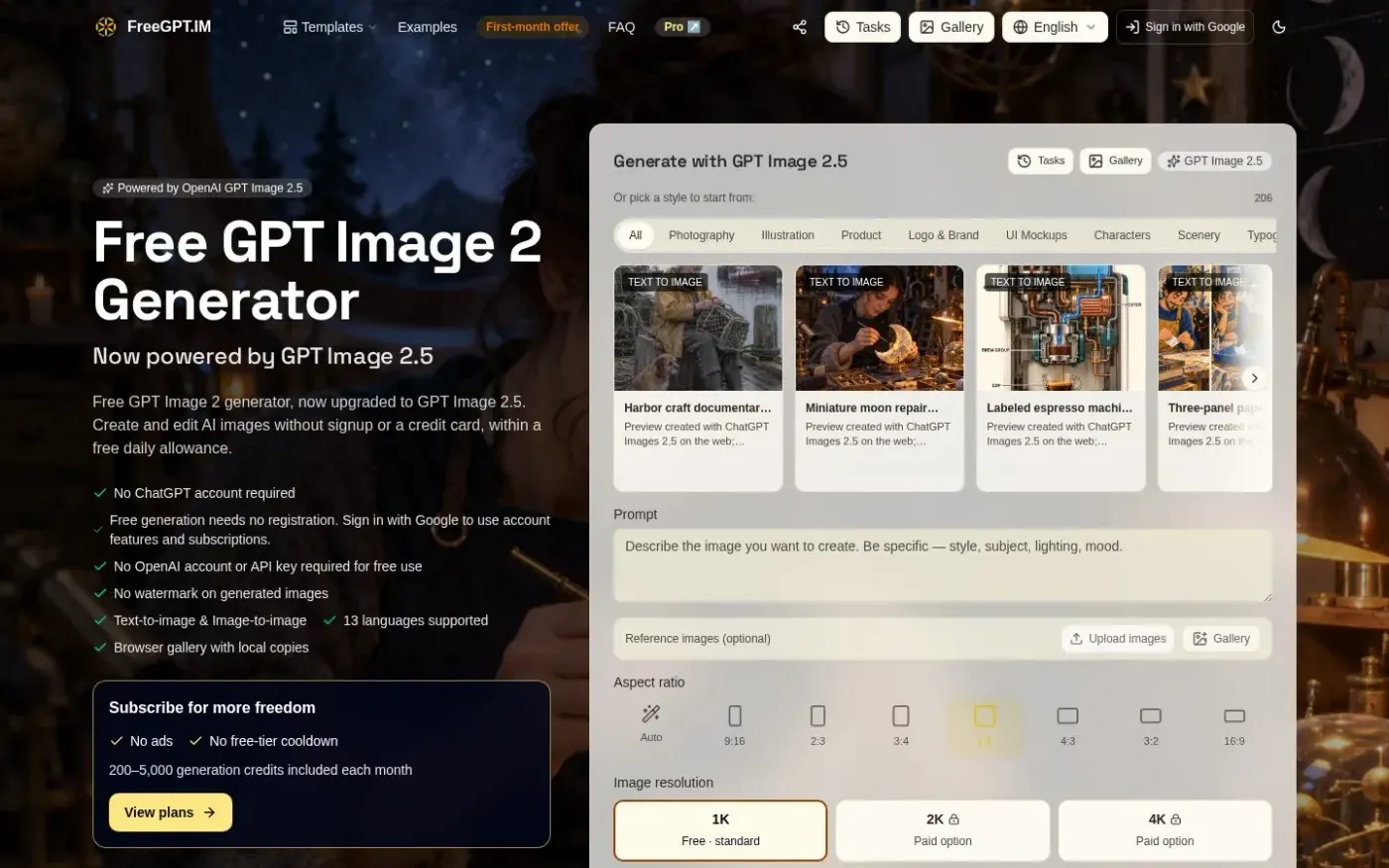
freegpt.im
FreeGPT.IM is a browser-based AI image generator powered by OpenAI's GPT Image 2.5. It allows users to create and edit images using plain language or reference uploads without requiring registration or a credit card. The service includes a free daily allowance of five images and features a local browser-based gallery for saving results.